Knowledge Base
-
Backup
- How to take backup and restore backup of messages ?
- How to export MMS? (Android only)
- How frequently Calculator Pro+ takes auto backup?
- How to get lost messages ?
- When data get lost?
- How to move Private Contacts and Messages to my new phone? (Android only)
- How to reinstall application ?
- How to stop auto backup ?
-
Chat
-
Disappearing Messages
-
Installation
-
MMS
-
Mobile
-
Notification
-
Premium Feature
-
Private Contact
-
Settings
- What are supported network options in Calculator Pro+?
- How to disable Calculator Pro+ for specific time? (Android only)
- Change time for automatically close Calculator Pro+ application
- Close Calculator Pro+ application on screen off (Android only)
- How to disable Calculator Pro+ lock screen?
- Set Fake PIN in Calculator Pro+
- Use Calculator Pro+ application for only free messaging application.
- How to close application by shaking phone in emergency?
- How to find Device ID of Calculator Pro+ app ?
- How to change PIN or Password ?
-
SMS Credits
-
Theme
-
Usage
- How to open app? (Android only)
- Calculator Pro+ won’t open after firmware upgrade.
- How to delete contact from Calculator Pro+ and move messages back to native SMS app? (Android only)
- Calculator Pro+ is misbehaving, How to report you?
- Where saved MMS will be put? (Android only)
- How to open Calculator Pro+ app via web browser? (Android only)
- How I can move messages back to native inbox? (Android only)
- How to change notification icon?
- How to collect Device logs?
- How to enable free messaging between Calculator Pro+ users?
- Application sends message twice. (Android only)
- How to set default network to send message?
-
Verify Using WhatsApp & Telegram
-
Virtual Number
-
Migrate to Calculator Pro+
Table of Contents
< All Topics
How to buy SMS Credits
SMS credits are the balance you use to send text messages from your private virtual number in Calculator Pro+. You only pay for what you send — no contract, no monthly fee. This guide walks you through enabling messaging and topping up your credits in just a few minutes.
Before You Start
To buy and use SMS credits, you first need to enable free messaging and verify your phone number. If you’ve already done this, skip straight to Step 2 below.
Step 1: Enable Free Messaging
- Open Calculator Pro+.
- Go to settings.
- Click on “Enable Free Messaging”.
- Enter your phone number and verify it with the code you receive.
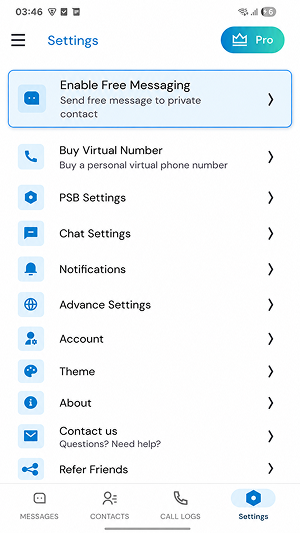
Once verified, free messaging is active and you’re ready to add credits.
Step 2: Buy SMS Credits
- Open Calculator Pro+.
- Click on top-right corner “Pro” button as it display in below screenshot.
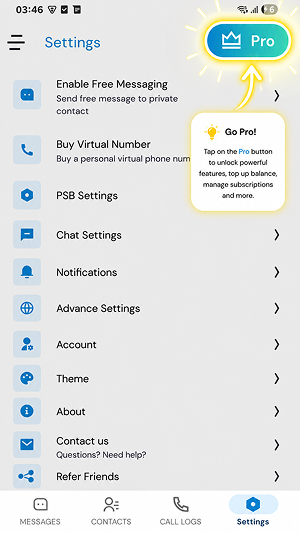
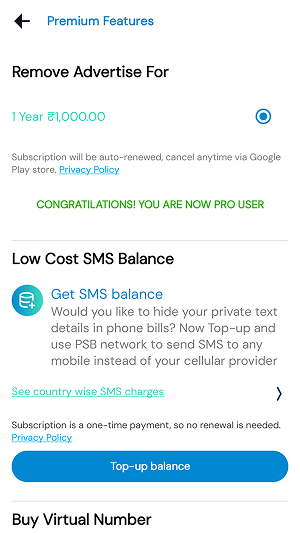
- Click on “TOP-UP BALANCE” and complete payment procedure.